The VAT statement printout shows all VAT-related transactions in a selected period. It is used to prepare the official VAT statement that must be submitted to the Danish Tax Agency, and at the same time provides a detailed overview of both output and input VAT.
Note: This is a description of the printout. The actual reporting to the tax authorities is done separately – either manually or automatically in Sapera.
See: Manual VAT reporting and Automatic VAT reporting
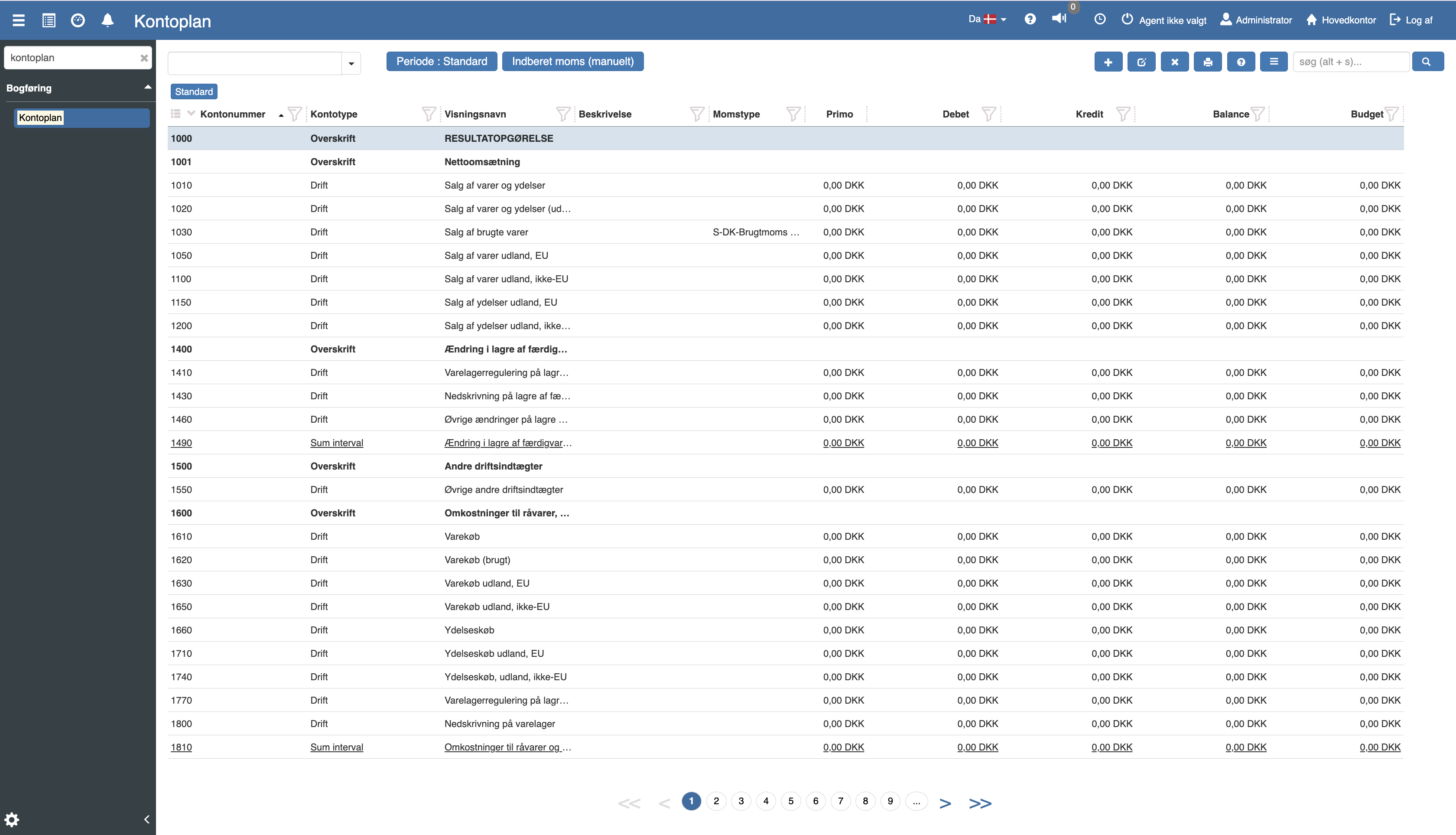
The printout can be generated as PDF, Excel or sent as an attachment via email.
See the print dialog.
Step by step
Go to Financial → Accounting → Chart of accounts
Click the printer icon in the top right
Select the printout VAT statement
Fill in the desired fields (see below)
Select the desired print format
Org. unit
Select one or more organizational units (store, department etc.).
Year
Specify the financial year the VAT statement should cover.
Period
Select the relevant period in the year. You can choose between months, quarters or custom periods.
Include previously settled
Yes: Includes previously settled VAT postings. Used for overview only – not for VAT reporting.
No: Includes only new postings. Recommended for reporting.
Include unsettled VAT from previous periods
Yes (default): Includes VAT from previous periods if they are only posted now.
This ensures correct VAT reporting.
No: Excludes these postings. Used for overview only – not for reporting.
Split basis per
Specify how the overview should be split:
Account: One line per account
Voucher: One line per voucher
Account & Voucher: Shows both levels
Include draft entries
Yes: Also includes draft entries (not yet posted) in VAT amounts and energy taxes. Used for overview and simulation – not for the final VAT reporting.
No (default): Includes only posted entries.
Note: Box A (EU acquisitions) always counts only posted entries – even when draft entries are included.
Structure
The printout consists of several sections that correspond to the fields in the tax authority's VAT report. Read more here.
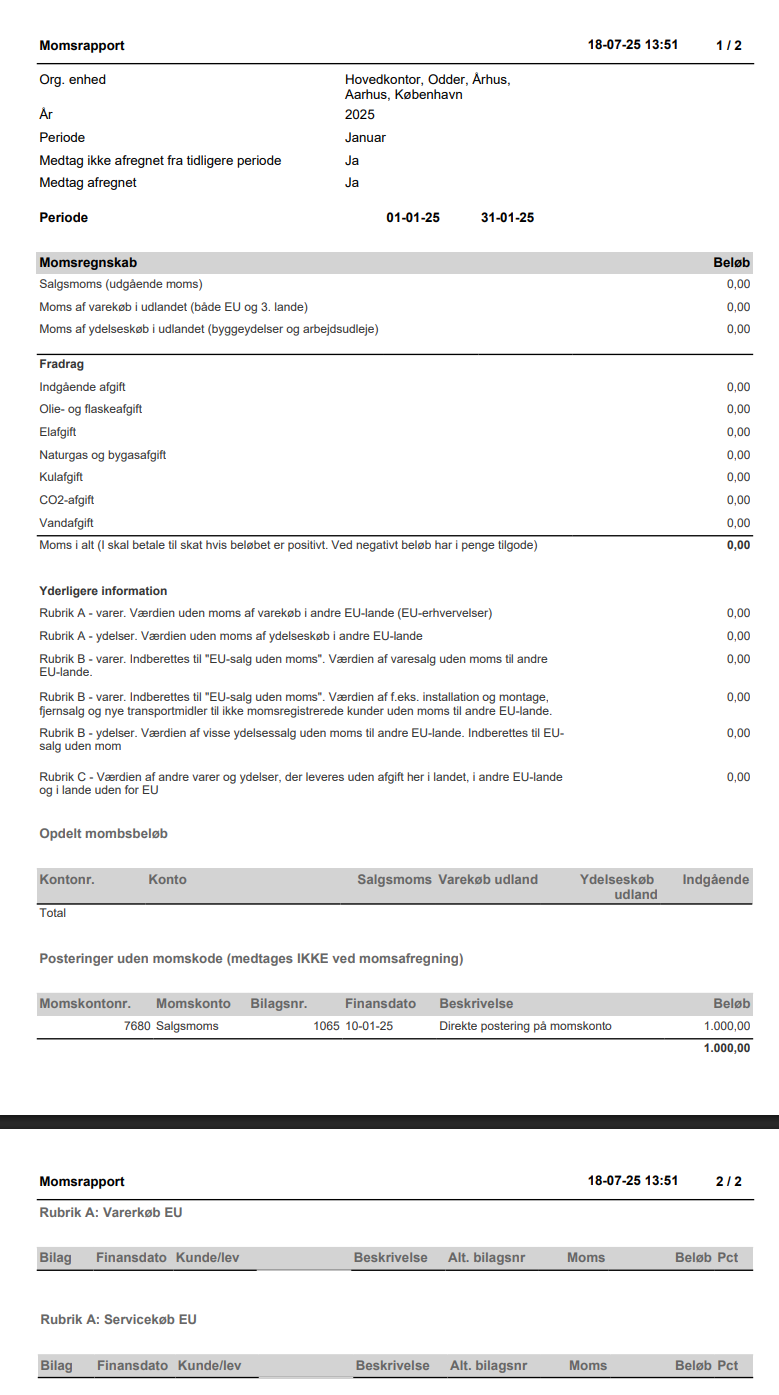
If rows are shown in the section Postings without VAT code, it is because there are postings on VAT accounts without an associated VAT type. This is most often seen with manual postings and should be checked.
If you manually post e.g. DKK 1,000 to an output sales account with the bank as the contra account, and without specifying a VAT type, the posting is shown in the section Postings without VAT code.
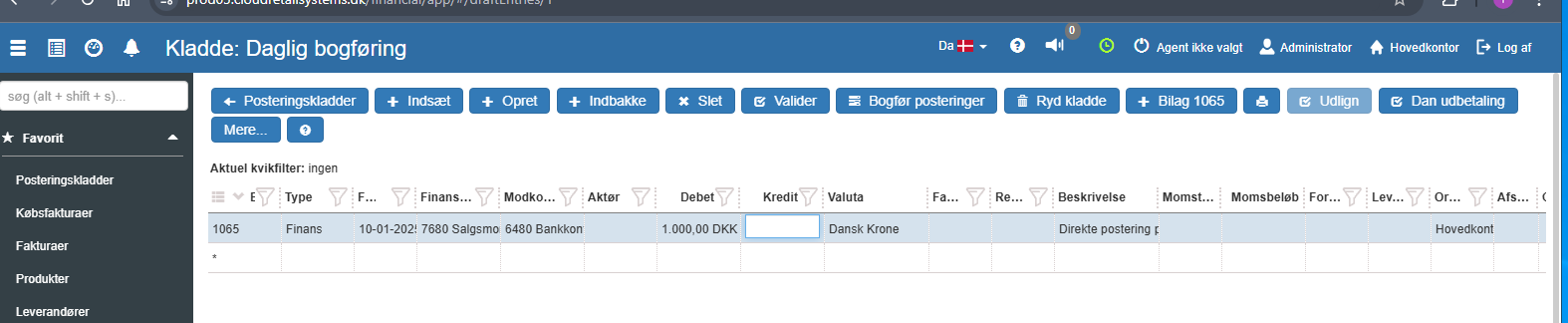
These postings are not included in the VAT settlement.
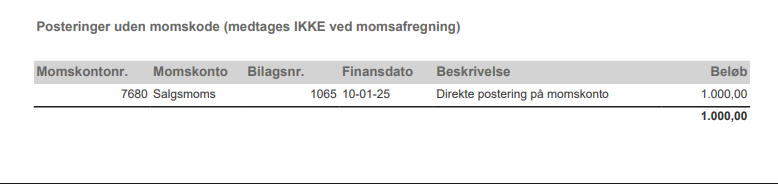
The section “Postings without VAT code” (NOT included in VAT settlement) will then look like this
How to add a VAT type to a posting
Go to the VAT account → Show postings
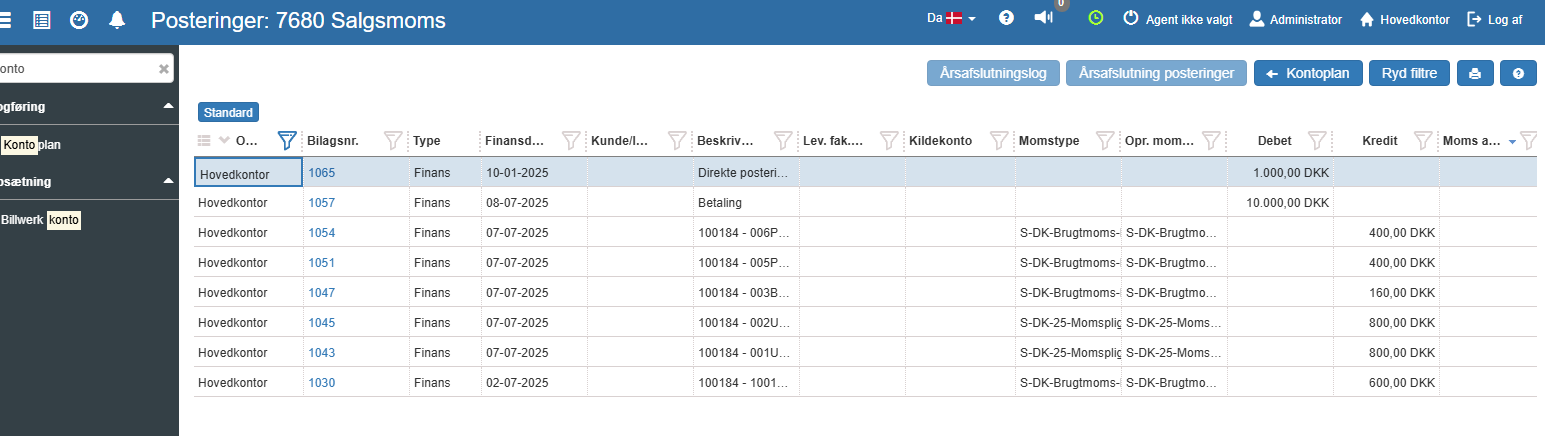
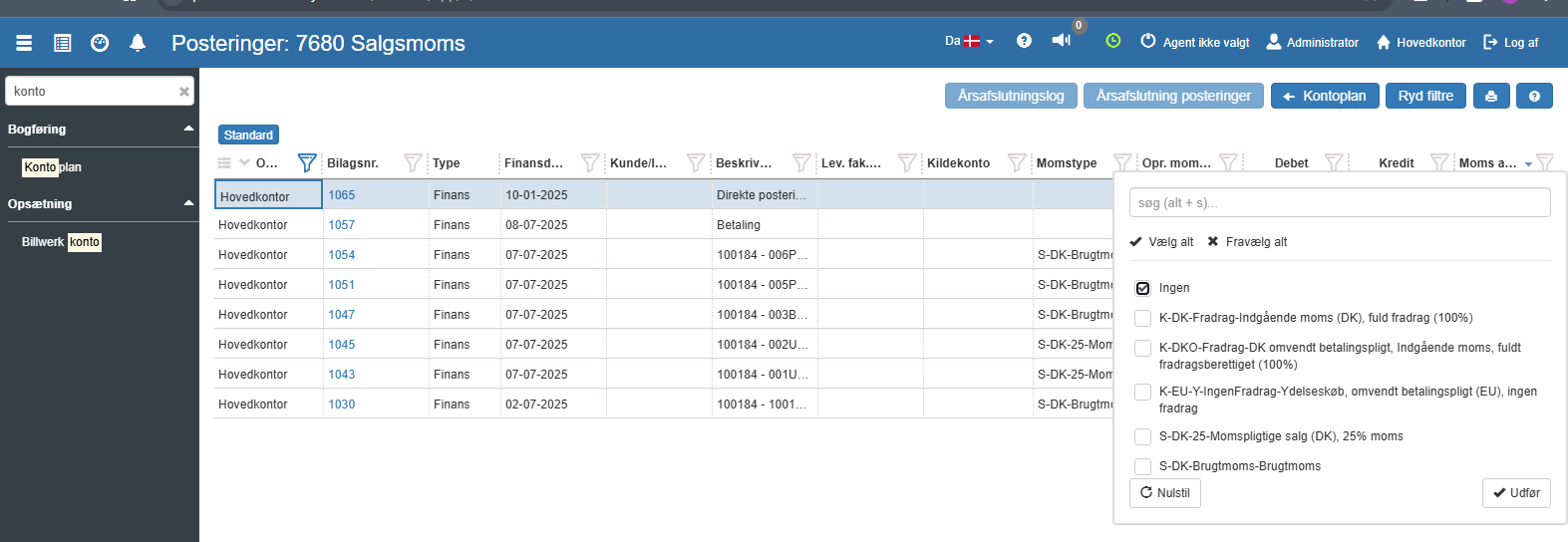
Filter on "None" under orig. VAT type
Find the posting and select the desired VAT type (e.g. S-DK-25)
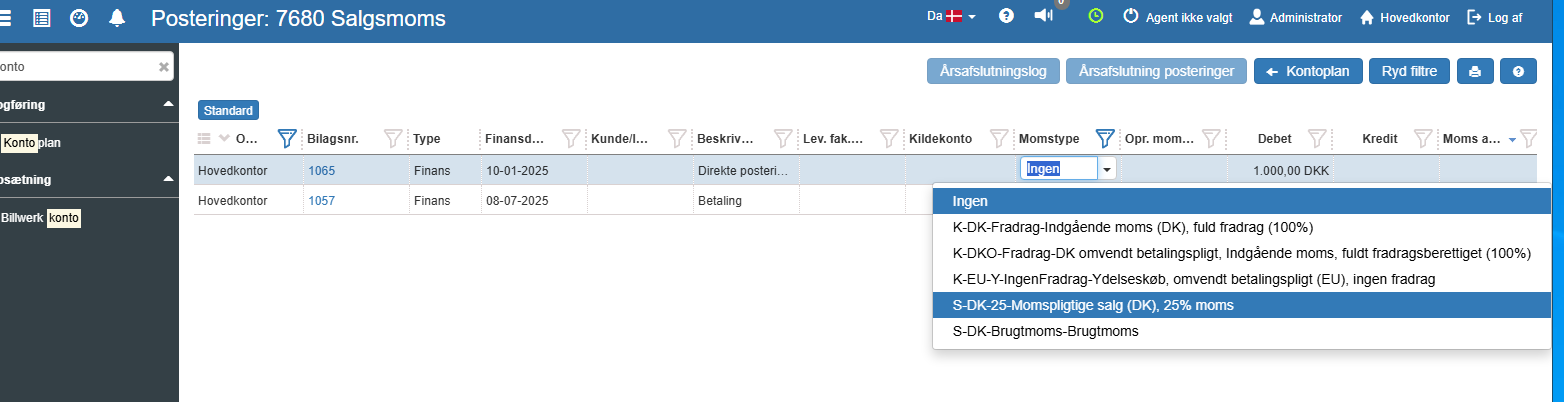
The posting is now included in the VAT statement, and is removed from the section “Postings without VAT code”
Manual postings related to VAT payments and settlement must not have a VAT type, as they should not be included in the VAT statement.
This box shows output VAT. This is determined based on the standard VAT type:
S1 new code S01
Sbrugt new code S83
Smargin new code S84
Smotor new code S85
Sleasing new code S86
Skunstnere new code S87
K-DK0-1 new code K660
K-DKO-2 new code K670
K-DKO-3 new code K680
K-DKO-0 new code K690
K-DKO-4 new code K700
This box shows VAT on purchase of goods abroad (both EU and third countries). This is determined based on the standard VAT type:
K-EU-V-1 new code K210
K-EU-V-3 new code K220
K-EU-V-0 new code K230
K-EU-V-2 new code K240
K-EU-V-4 new code K250
K-%EU-V-1 new code K410
K-%EU-V-3 new code K420
K-%EU-V-0 new code K430
K-%EU-V-2 new code K440
K-%EU-V-4 new code K450
K-%EU-Y-1 new code K460
K-%EU-Y-3 new code K470
K-%EU-Y-0 new code K480
K-%EU-Y-2 new code K490
K-%EU-Y-4 new code K500
This box shows VAT on purchase of services abroad (construction services and labour hire). This is determined based on the standard VAT type:
K-EU-Y-1 new code K260
K-EU-Y-3 new code K270
K-EU-Y-0 new code K280
K-EU-Y-2 new code K290
K-EU-Y-4 new code K300
K-EU-Y-L1 new code K330
This box shows all input tax. This is determined based on the standard VAT type:
K1 new code K010
K3 new code K020
K7 new code K610
K5A new code K040
K5B new code K050
KL1 new code K060
K25A new code K070
K25B new code K080
KL2 new code K090
KL3 new code K100
K2 new code K110
K6 new code K120
K4 new code K130
K-DK0-1 new code K660
K-DKO-2 new code K670
K-DKO-3 new code K680
K-DKO-4 new code K700
K-EU-V-1 new code K210
K-EU-V-3 new code K220
K-EU-V-2 new code K240
K-EU-V-4 new code K250
K-EU-Y-1 new code K260
K-EU-Y-3 new code K270
K-EU-Y-2 new code K290
K-EU-Y-4 new code K300
KL-EU-2 new code K310
KL-EU-3 new code K320
K-EU-Y-L1 new code K330
K-%EU-V-1 new code K410
K-%EU-V-3 new code K420
K-%EU-V-2 new code K440
K-%EU-V-4 new code K450
K-%EU-Y-1 new code K460
K-%EU-Y-3 new code K470
K-%EU-Y-2 new code K490
K-%EU-Y-4 new code K500
This box shows the value excluding VAT of goods purchased in other EU countries. This is determined based on the standard VAT type:
K-EU-V-1 new code K210
K-EU-V-3 new code K220
K-EU-V-0 new code K230
K-EU-V-2 new code K240
K-EU-V-4 new code K250
This box shows the value excluding VAT of services purchased in other EU countries. This is determined based on the standard VAT type:
K-EU-Y-1 new code K260
K-EU-Y-3 new code K270
K-EU-Y-0 new code K280
K-EU-Y-2 new code K290
K-EU-Y-4 new code K300
K-EU-Y-L1 new code K330
This box shows the value of goods sales without VAT to other EU countries. - this is determined based on the standard VAT type
S2 new code S21
This box shows the value of e.g. installation and assembly, distance selling and new means of transport to non-VAT-registered customers without VAT to other EU countries - this is determined based on the standard VAT type
S7 new code S22
This box shows the value of certain service sales without VAT to other EU countries reported to EU sales without VAT, this is determined by the standard VAT type
S3 new code S23
This box shows the value of other goods and services supplied without tax within the country, in other EU countries and in countries outside the EU, this is determined by the standard VAT type
S4 new code S41
S5 new code S42
The printout also has a setting that controls its behaviour but is not shown in the print dialog. It can be adjusted by support per company. If you want the printout customized, contact support and refer to the relevant setting below. The technical name of the setting is shown in parentheses.
Other
Time zone used when calculating periods and dates (timezone)
Want to know more?
Read more in these related articles:
VAT reporting - automatic
This article explains how VAT reporting is performed automatically via the tax authority's API in Sapera
Report VAT (manually)
Report VAT (manually)
Print dialog
This article explains the functions and options of the print dialog in Sapera
