The overview contains the following columns:
Number: The account's unique number.
Type: The account's type can be either:
Heading
Sum
General ledger
Display name: The name shown for the account.
Enabled: If this box is checked, selected accounts will be created as enabled (not hidden).
Is balance account: Indicates whether it is a balance or operating account. The selected account will be created as either an operating or a balance account depending on the choice made here.
Enabled for manual postings: Allows manual postings in a posting journal. If not checked, postings can only be created through the finance module (e.g. invoice or purchase invoice) or the point of sale module. Note that these postings are posted automatically based on the setup in Sapera.
Is customer or supplier required: This field should only be checked for debtor or creditor control accounts.
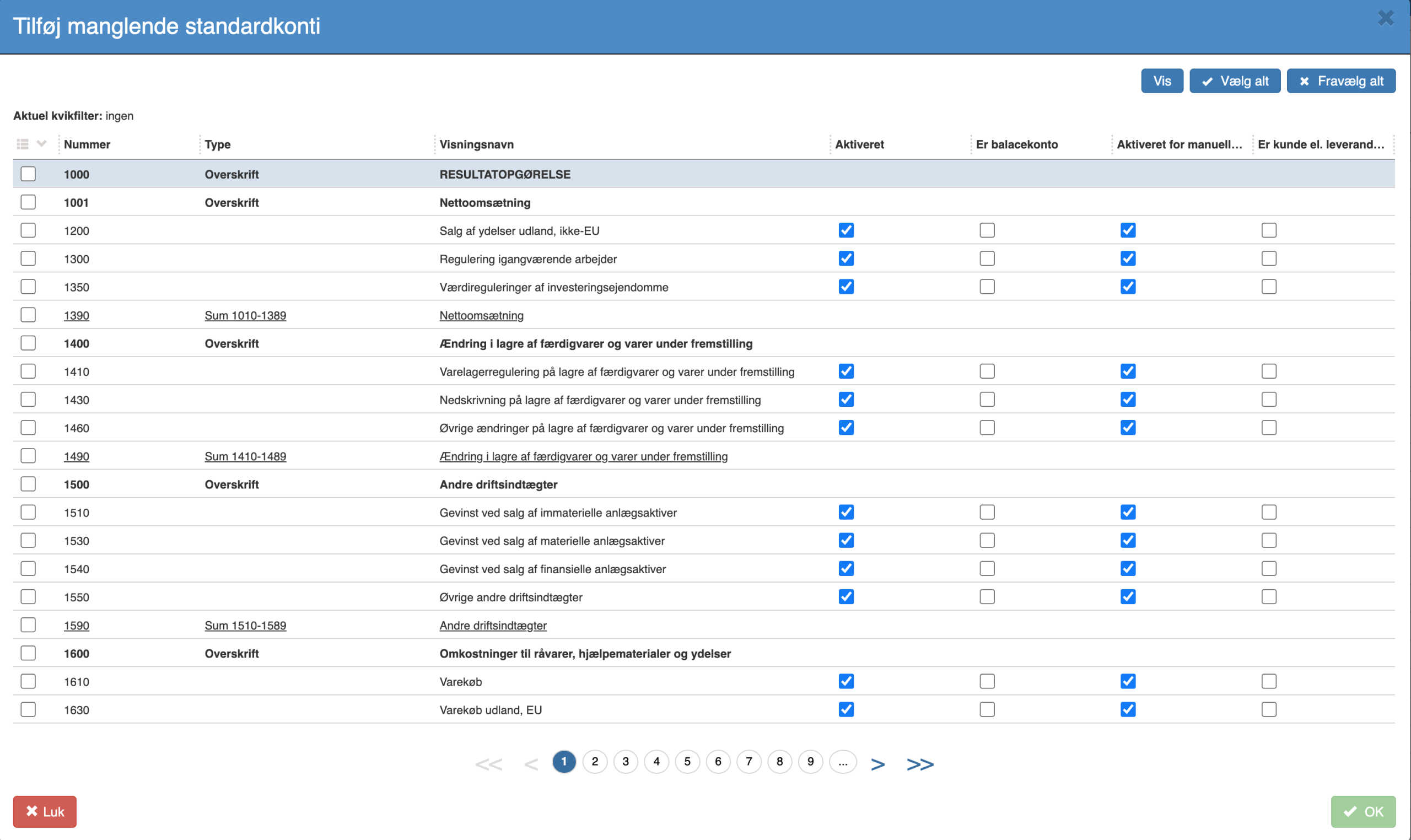
To create accounts in your own chart of accounts based on default accounts, you must either:
Manually select the desired accounts in the first column.
Use the "Select all" function in the menu.
The selected accounts are created automatically in your own chart of accounts and mapped directly to the corresponding default accounts. The accounts are created with the settings shown in the table above.
For further information about the contents of the default chart of accounts, please refer to the official default chart of accounts prepared by the Danish Business Authority.
Want to know more?
Read more in these related articles:
View default chart of accounts
Get an overview of the default chart of accounts in Sapera — review accounts and VAT types, understand the associated fields, and see how the default plan can be used as a template for the accounting setup.
Chart of accounts
Get an overview of all accounts in the company's chart of accounts. Create, edit, and delete accounts, track movements, and manage budget and periods directly from this screen in Financial.
Accounting - Creating accounts
This article explains how to create new accounts in the Chart of accounts via Financial
