The entry archive in Sapera is a central function that gives companies and organizations a consolidated overview of all financial transactions and entries. It acts as a comprehensive database where all posted entries are stored, so they can easily be retrieved, analyzed or audited at a later point. This makes the archive an invaluable resource for financial management and accounting work.
With the entry archive you can trace transactions back to their origin, which is essential for both internal control and external auditing. It ensures that all entries are correct and complete, contributing to accurate and reliable financial reports. The function also allows quick searching and access to historical entries, making it easier to investigate previous financial activities.
1. From Shop Manager, go to "Accounting".
2. Navigate to "Entry archive".
3. You are now on the "Entry archive" tab, where an overview of your entries in Sapera is visible.
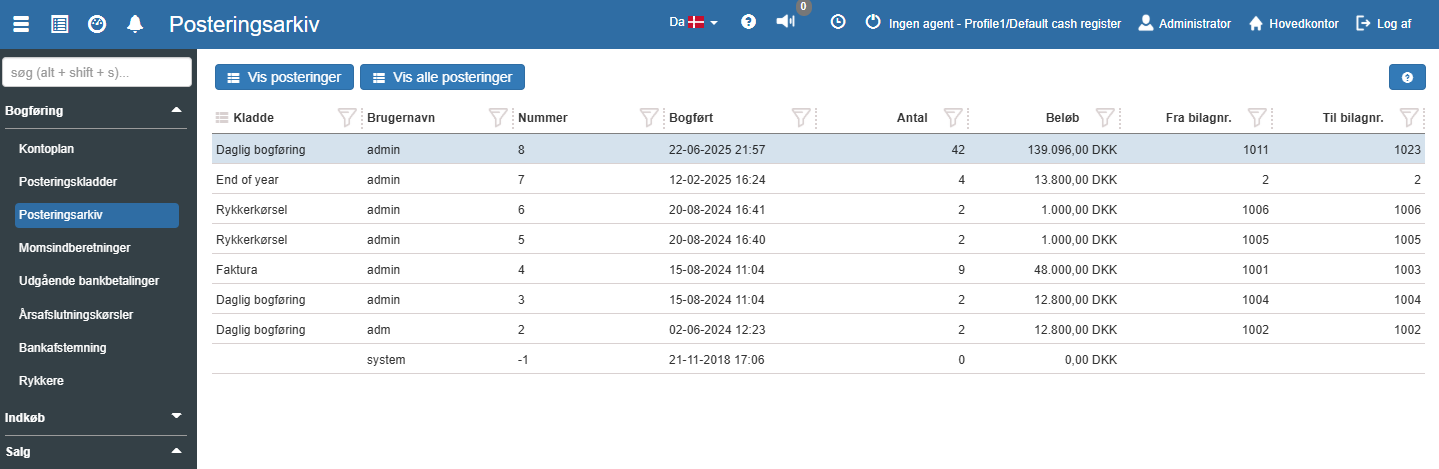
Show entries:
Opens "Entry archive - Entries" for the selected transaction ID. See more here.
Show all entries:
Opens the "Entry archive - Entries" section, which will show all entries that have ever been posted by the company. See more here.
You can select which columns should be visible. This is done using quick filters. The possible columns in this overview are:
Transaction ID:
The number of the day closing.
Voucher number:
The voucher number in the accounting module (this can be set up to follow the number of the day closing).
Statement date:
The date the day closing was completed.
Org. unit:
The org. unit the day closing belongs to.
Cash register:
The current cash register (point of sale).
Cashier:
The employee who performed the count.
Cash holdings:
The counted cash amount.
State:
Sum of credit amounts made on the account in the selected period.
From sales number:
The number of the first sale that is part of this count.
To sales number:
The number of the last sale that is part of this count.
Want to know more?
Read more in these related articles:
Entry archive - entries
Overview of all completed posting runs and the financial entries belonging to them. Here you can search, filter and export entries to accounting systems such as e-conomic, Inventio.It and BC Microsoft Cloud.
Entries
Get an overview of all posted financial entries for a specific finance account. Learn to filter, navigate to and from the chart of accounts, edit the VAT type directly in the list and apply year-end actions.
Entry journal
Learn to work in the entry journal: create, edit and delete entries, use keyboard shortcuts, validate and post vouchers, settle debtor/creditor entries and understand all columns and control panels.
