
Purpose
Sapera supports storing notes in several places throughout the system.
A finance voucher can have notes. The same applies to customers, suppliers, etc. The following is a general description of the notes functionality.
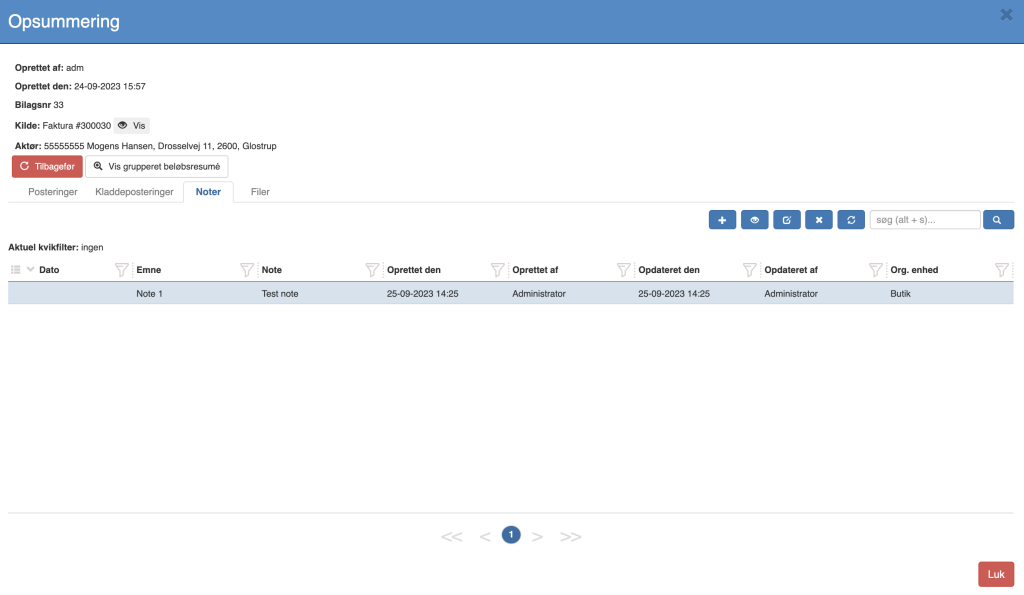
Actions
New: Creates a new note
View: Shows an existing note
Edit: Edits an existing note
Delete: Deletes the selected note
Columns / fields when creating / editing
You can define which columns should be visible.
This is done using quick filters.
The possible columns in this overview are:
Date: The date the note concerns. This can be filled in retroactively. E.g. a board meeting where the note is first created the next day in Sapera.
Subject: The subject of the note
Note: The note itself
Created on: Date of creation
Created by: The user who created the note.
Updated on: Date of the most recent edit.
Updated by: Last edited by user.
Org. unit: The store / department the note concerns. See org. units.
Note that files can be attached to notes.
Want to know more?
Read more in these related articles:
Attachments
Attach one or more files to a record in Sapera (voucher, customer, supplier, product and more) — and see the automatically attached PDFs
Voucher dialog
This article walks through how the voucher dialog in Sapera provides a consolidated overview of posted vouchers and their associated entries