
What are emails in Sapera?
Emails in Sapera provide a unified overview of the messages sent from the system to customers or internal users. This can be, for example, order confirmations, invoices or service notifications. The email overview makes it easy to keep track of what was sent when and to whom, and you can use the columns to quickly find specific messages.
How do I access emails?
1. From the hamburger menu, access "Financial"
2. From "Financial", access "Calendar / Communication"
3. From "Calendar / Communication", access "Emails".
You are now on the "Emails" page, where you find a unified overview of your sent emails in Sapera.
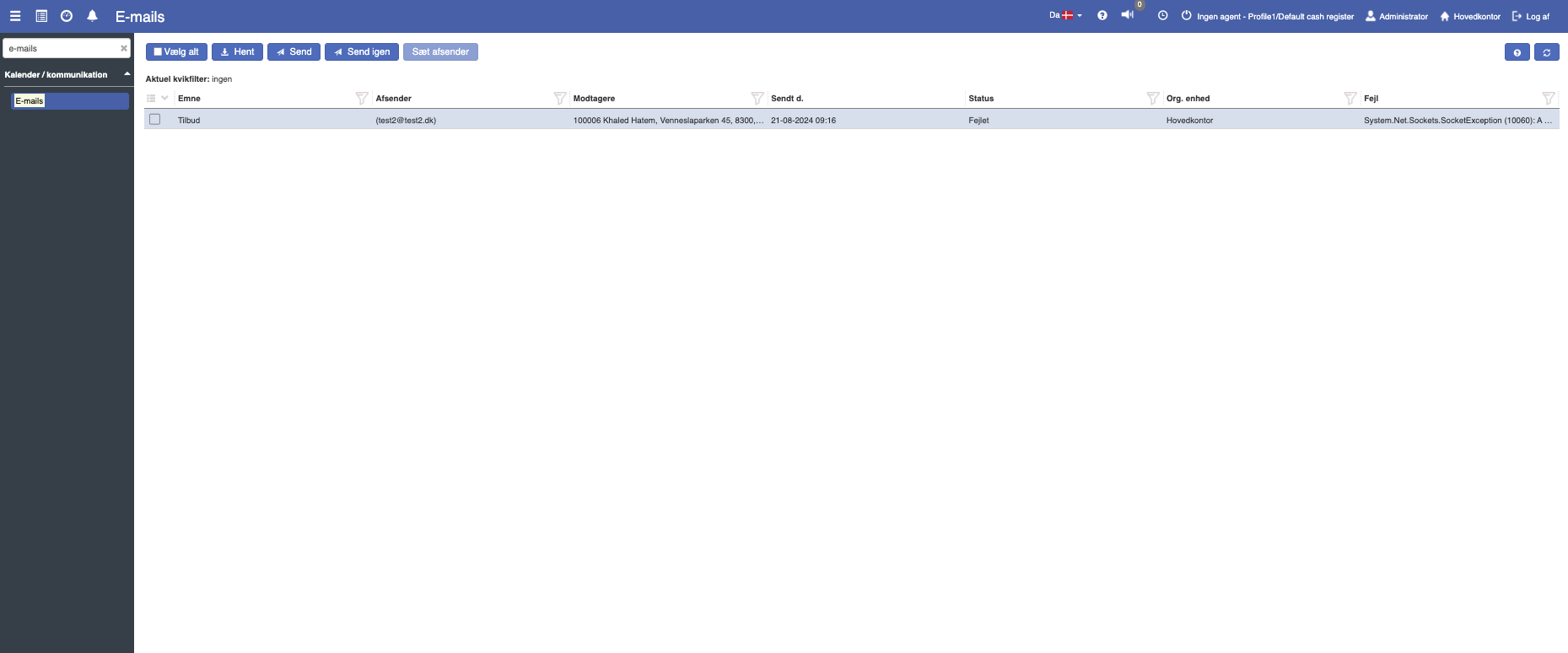
Description of columns
Subject:
Describes the subject of the email. This could for example be an invoice sent to a customer.
Sender:
This shows the sender of the email. It could for example be "Company Ltd. Aarhus" that sent the email.
Recipients:
This column states who received the email. Most often this will be registered customers in Sapera.
Sent on:
States the send date of the email.
Status:
States which status the specific email send is in. In the image above, all emails have the status "Sent", which means the email has been sent to the recipient / customer.
In addition, "Scheduled" and "Failed" are alternative statuses for the email.
Org. unit:
This column states which organizational unit the email was sent from. This could for example be "Aarhus".
Error:
If an error occurs in connection with sending your invoice, the error will be stated in this column.
Want to know more?
Read more in these related articles:
Email queue
The email queue gives you a unified overview of all outgoing emails in Sapera — whether they were sent successfully, are awaiting processing or have failed. You can filter, sort and investigate error messages directly in the overview.
SMS messages
Get an overview of all SMS messages sent from the system, send new SMS messages and resend failed messages directly from the log.
SMTP server
Set up an SMTP server in Sapera so the system can send emails such as order confirmations, customer messages, signature invitations and payment links.