SyncTool is typically installed here (comes with the CRS.Agent installation)
Log in to SyncTool.
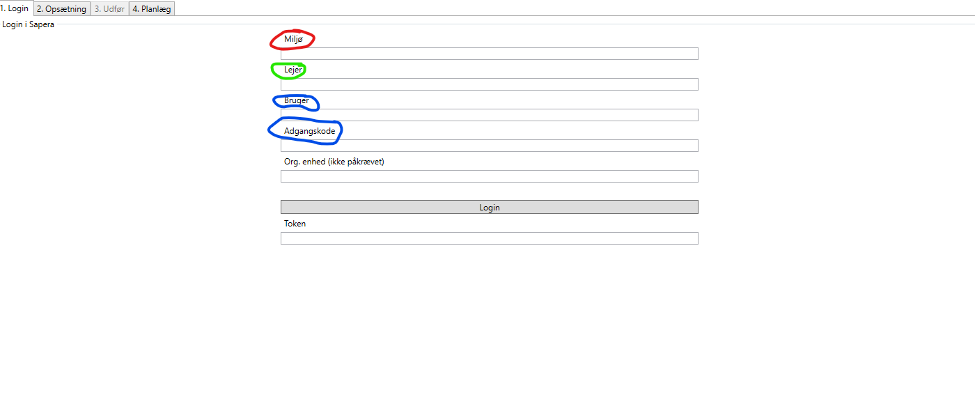
REMEMBER to write “shadow” in “Environment” when this is desired. For example prod02shadow
(2. Selected action) → Select: “Products”
(3. Input source for current action) → Click: “Fetch source file” and “Show input data” if you want the source data displayed.
Set the comma separator (e.g. if prices in the file are 996.96, set the comma separator to a period)
Edit the “Source” column in “Destination” so the source file columns are paired with destination columns.
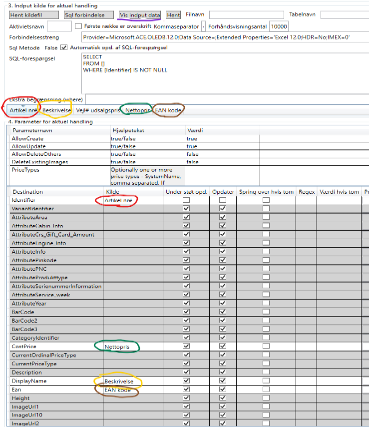
(The “Support create” column applies the selected option to newly created items)
(The “Update” columns also update existing items with the selected option)
If you just need to update prices:
Identifier - Item number
CostPrice - Cost price (must be excl. VAT)
SalesPrice - Sales price (must be incl. VAT)
If you need to add new items, you must as a minimum also include:
DisplayName - Item text
EAN - EAN (barcode)
Categoryidentifier - Product category
SupplierIdentifier - Supplier
Click:
“Fetch” to fetch the input data (source file content)
“1. Compare (current)” for a preview of the import
Yellow = Changes, Green = Creations and failed, White = Skipped
“2. Update Sapera (current)”
Yellow = Changes, Gray = Unchanged
Open the comparison file to get those that could not be matched with an existing item number.
When everything has been completed in Shadow - go back to “Login - Environment” and delete “shadow”, so updates can be made in Sapera production
Want to know more?
Read more in these related articles:
Sales prices (report)
Print or export a complete overview of all products' cost prices and sales prices per sales price type - as PDF or Excel.
Create a new sales price type
This article reviews how to create and use interval-based sales price types to give a discount on multiple products at the same time
Sales price types
How to create, edit and manage sales price types in Sapera, including Normal and Interval types, override rules, source sales price type setup and Clear sales prices.
