1. From Financial, go to "Product" → "Products".
2. From the Products page, you can click the printer icon in the top right corner.
3. Select the "Sales hit list" printout
4. Fill in the fields (the fields are described below)
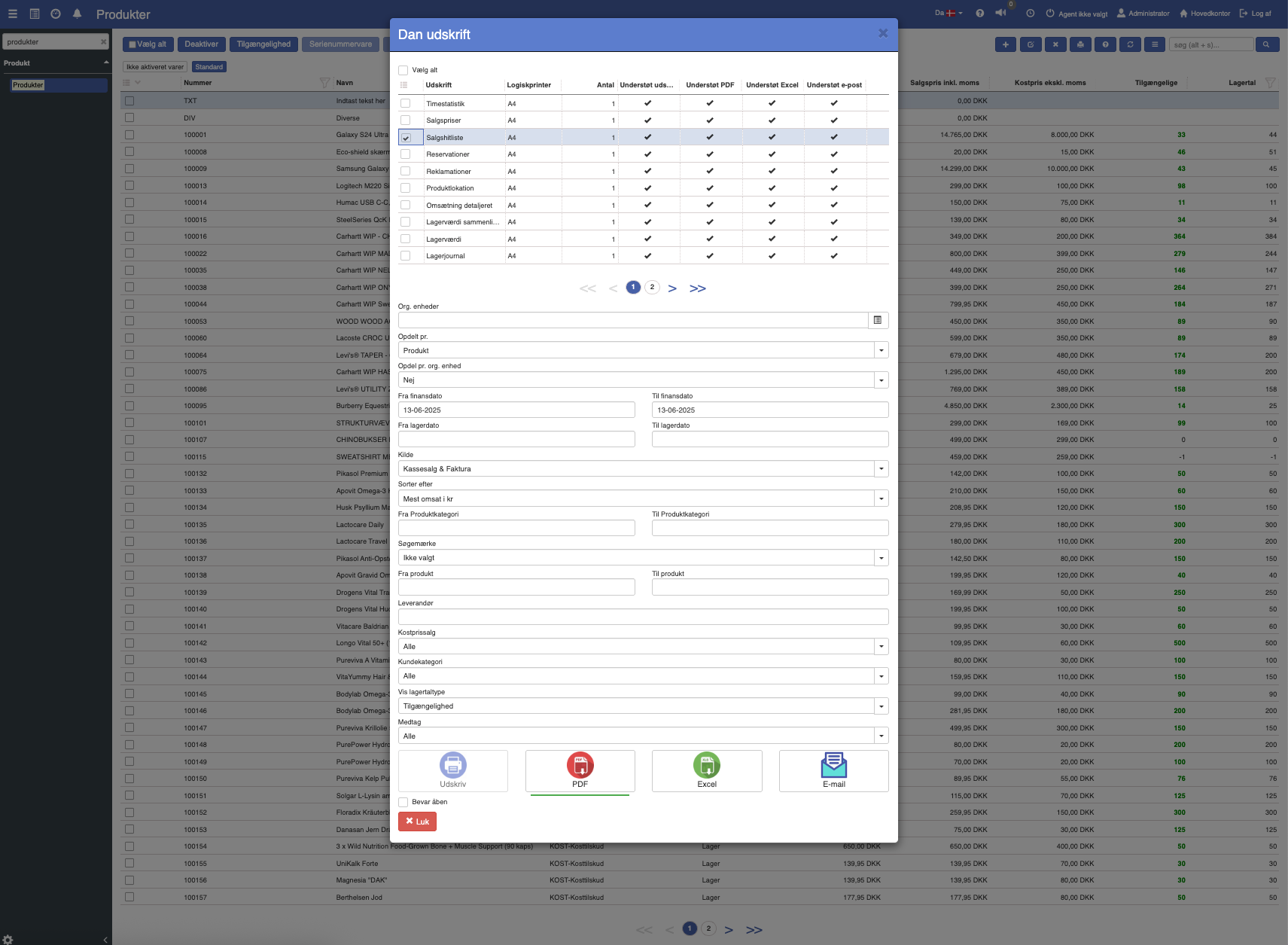
5. Click the print format you want to print in.
The sales hit list can also be printed from the top print menu in the main bar at the top of Sapera.
The sales hit list printout can be printed based on a range of different criteria. These are listed below:
None: Sales are shown as a total without grouping.
Financial date: Here sales are grouped by the financial date.
Main category: Here sales are grouped by main category.
Source: Here sales are grouped by the source of the sale (e.g. invoice or POS sale).
Customer: Here sales are grouped by customer.
Customer category: Here sales are grouped by which customer category the customer belongs to.
Supplier: Here sales are grouped by which supplier the item is associated with.
Location: Here sales are grouped by warehouse location.
Employee: Here sales are grouped by the employee who completed the sale.
Orig. salesperson: Here sales are grouped by the original salesperson.
Product: Here sales are grouped at item level.
Product / Variant / Serial number: Here sales are grouped by product, variant and serial number.
Product category: Here sales are grouped by the specific product category.
Sale: Here sales are grouped by sale type.
Sales date: Here sales are grouped by the sales date.
Postal code: Here sales are grouped by the customer's postal code.
Product field: Here sales are grouped by the value of the dynamic product field that support has configured on the printout. Products without a value are collected under "Ikke angivet" (not specified).
Yes: The sales printout list will group per org. unit.
No: The sales printout list will not group per org. unit.
From / to financial date: Here you specify the date range for the sales hit list printout.
From / to inventory date: Here you specify the date range for the sales hit list printout.
POS sale: Shows sales completed at the POS.
Invoice: Shows sales invoiced to customers.
POS sale & Invoice: Shows sales completed both as POS sales and invoices.
Order: Shows sales completed via orders.
Draft: Shows sales that have not yet been finally posted.
POS sale, Invoice & Order: Shows all sale types except drafts.
All incl. draft: Shows all sale types, including drafts.
Highest revenue in DKK: Shows the products or categories with the highest revenue in DKK.
Lowest revenue in DKK: Shows the products or categories with the lowest revenue in DKK.
Highest revenue by number of sales: Shows the products or categories with the most sales.
Lowest revenue by number of sales: Shows the products or categories with the fewest sales.
Largest contribution margin: Shows the products or categories with the largest contribution margin.
By grouped by: Shows revenue grouped by the selected criterion.
Most sold by units: Shows the products with the most units sold.
Least sold by units: Shows the products with the fewest units sold.
From / to product category: Here you specify the range of product categories to be included in the sales hit list printout.
Here you can specify which search tag the category should follow as a criterion.
From / to product: Here you specify the range of products to be included in the sales hit list printout.
Here you can specify which supplier you want the printout to take its data from,
All: Shows both sales at cost price and at normal price.
Cost price only: Shows only sales registered at cost price.
Normal price only: Shows only sales registered at normal price.
Here you can specify which customer category you want the printout to take its data from,
Here you can enter a value and only include sales for the products where the configured dynamic product field has exactly that value. Leave the field empty to include all products.
Stock figure: Shows the stock figure together with the sales hit list.
Availability: Shows only the availability of the items in connection with the sales hit list.
All: Shows all types of items.
Products: Shows only products without variants.
Variants: Shows only variants of products.
Products & variants: Shows both products and their variants.
Serial number items: Shows only items with serial numbers.
Beyond the many filters shown in the print dialog, the revenue report has a few settings that control content and grouping. They can be turned on/off or adjusted by support per company. If you want the printout customized, contact support and refer to the relevant setting below. The technical name is shown in parentheses.
Show the supplier item number (groupbysupplieridentifier)
Include orders that are still in draft (includeordersindraft)
Limit to a specific dynamic field and its value (datafieldsystemname, datafieldvalue)
Choose which dynamic product field the "Product field" grouping and filter should use (productattributesystemname)
Want to know more?
Read more in these related articles:
Revenue detailed
Detailed revenue printout per item for a selected date range, with sales figures, revenue, contribution margin and contribution ratio.
Product sales history
The Product sales history printout shows the individual product's sales over a selected period, broken down by invoice sales and POS sales.
Task planner
Settings for displaying and configuring the calendar (the task planner) in Sapera
